MT4 and MT5 accounts
Forex, gold, oil, indices — whatever your broker offers on MetaTrader.
- Every closed trade, with stop-loss and target
- Partial closes as separate entries
- Deposits and withdrawals
- Balance, equity and Real / Demo status
 Yashdhan
Education & Tools
Yashdhan
Education & Tools
TRADING JOURNAL
Every MT4 and MT5 trade is logged the moment it closes. Indian market trades take seconds to add. Each one is checked against your own plan — so you can see exactly where your discipline breaks.
What you get
Closed trades, partial closes and deposits or withdrawals are picked up for you. Missed something while offline? It catches up when your terminal is back.
Set your rules once: risk per trade, daily loss limit, trades per day, stop-loss required, minimum R:R, allowed sessions. Every break is flagged.
See your real capital and a risk amount that grows and shrinks with your account. It halves automatically after a 30% drawdown.
Equity curve, calendar, profit factor and drawdown — plus P&L by symbol, weekday, session, timeframe and emotion.
Mark FOMO, revenge trades, early exits and how you felt. See what each mistake really costs you.
More than one account connected? Filter every screen by Real, Demo or a single account.
Log NIFTY, BANKNIFTY, stocks and F&O with lot sizes and charges — the P&L is calculated for you.
Private to your login. Download everything as a CSV file whenever you like.
Why a journal
See it in action
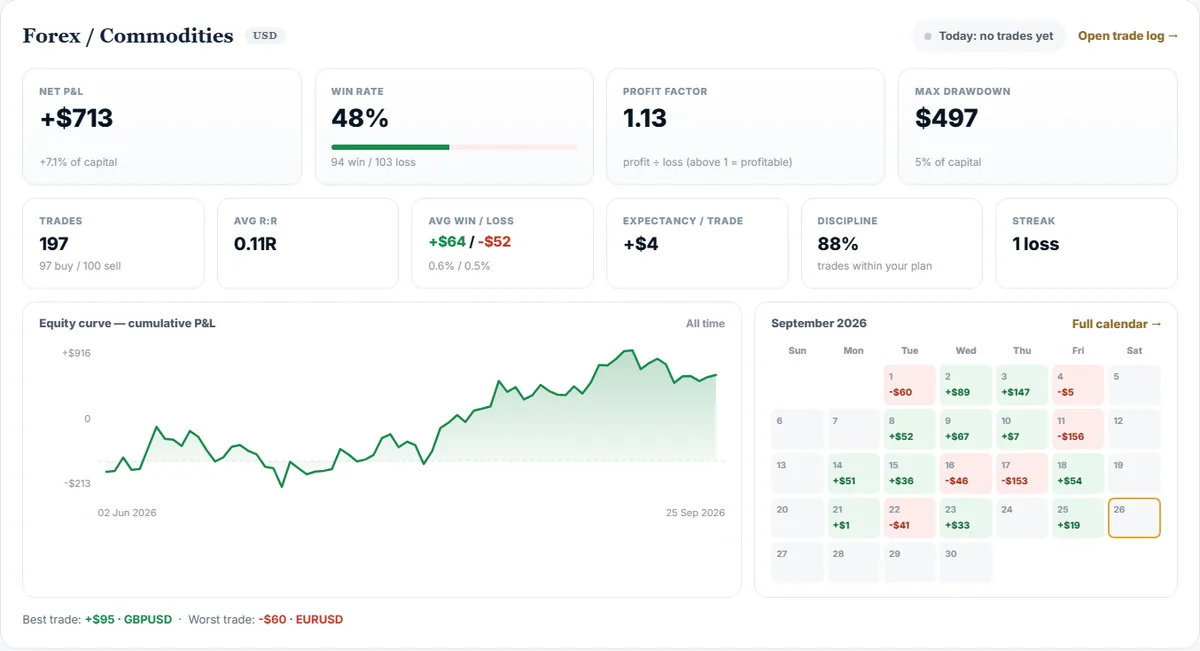
Net P&L, win rate, profit factor, drawdown, an equity curve and a day-by-day calendar — for each market.
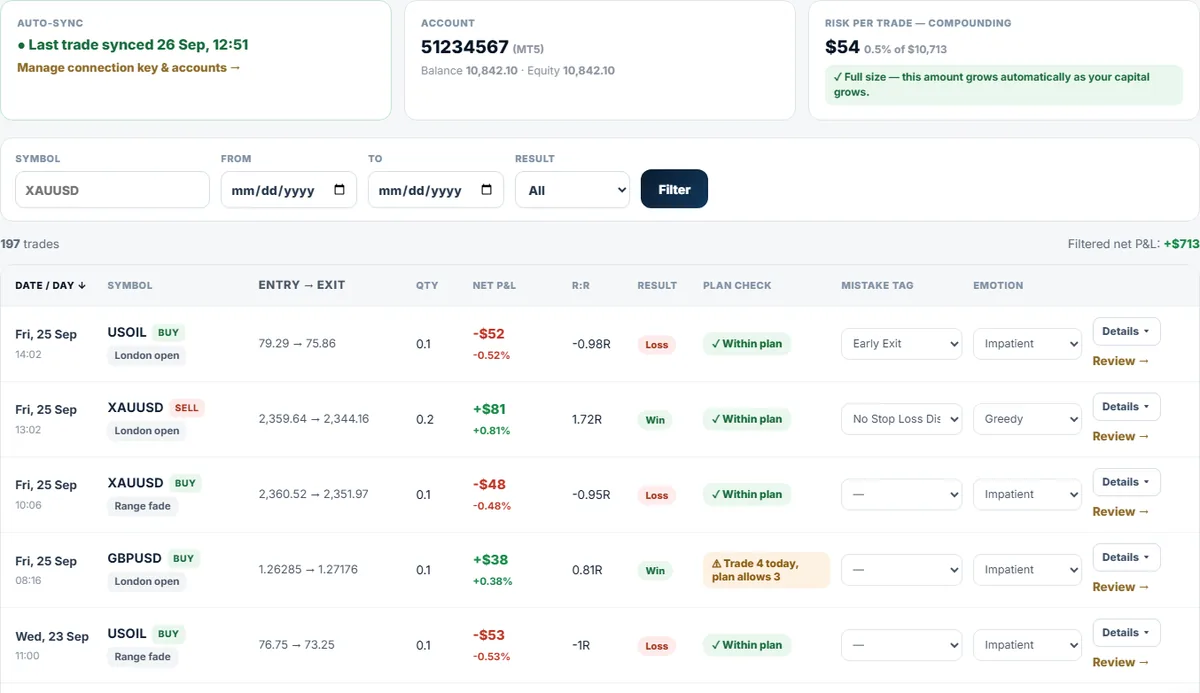
Sort and filter your trades, tag the mistake and the emotion in one click, and open any trade to review it.
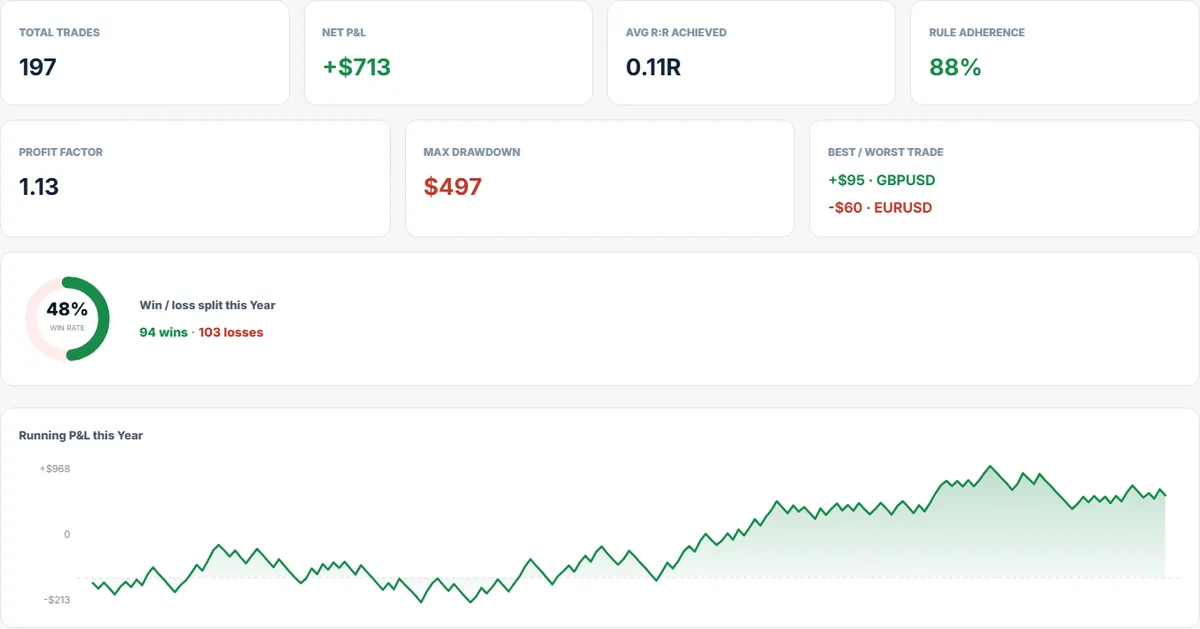
Charts by day, week, month or year: by symbol, weekday, session, emotion and the cost of each mistake.
The screens show sample data, not real results. Your Journal will show your own trades.
How it works
Good to know
Forex, gold, oil, indices — whatever your broker offers on MetaTrader.
Indian brokers such as Zerodha, Upstox and Angel One do not allow add-ons like this, so you add each trade yourself in a few seconds.
Plans · USD
Access opens in your account right after payment. No account is needed to look around.
30 days access
Up to 1 MT4 / MT5 account(s)
Buy this plan90 days access
≈ $8.33 / month
Up to 1 MT4 / MT5 account(s)
Buy this plan365 days access
≈ $7.32 / month
Up to 1 MT4 / MT5 account(s)
Buy this planPrices are shown before you pay. See the refund policy and risk disclosure at checkout.
Questions
No. The Journal EA only sends closed-trade details together with your personal connection key. It never asks for, stores or sends your broker or investor password.
MT4 and MT5 sync automatically. Indian market trades (NSE, BSE, MCX) are added by hand, because Indian brokers do not allow add-ons like this. The same plan checks and charts apply to both.
The EA runs inside MT4 or MT5 on a computer or VPS that stays switched on. Once trades have synced you can open your Journal from any phone or laptop.
When you start it again the EA re-checks your recent history and fills in whatever was missed. Trades already in your Journal are never added twice.
Each plan below shows how many MT4 / MT5 accounts it includes. Need more? Contact support. Real and demo accounts can be viewed separately.
Only you can see your Journal. You can download all your trades as a CSV file at any time.
No. The Journal is a record-keeping and self-review tool. It gives no trading signals or recommendations, and past results do not guarantee future results.
Start journaling today. Your first trades appear in your Journal within minutes of connecting.
Educational tools only — no investment advice and no guaranteed returns.
Ready to start?
Try TradingView Setup and MT5 Risk Manager yourself — no pressure, no rush. A disciplined, honest option before you commit to anything bigger.
Educational tools only. No investment advice. No guaranteed returns. Trading involves risk. Yashdhan is not acting as a SEBI-registered investment adviser unless its legal status is explicitly updated.